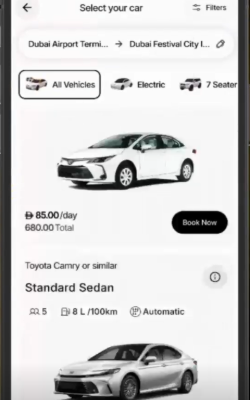
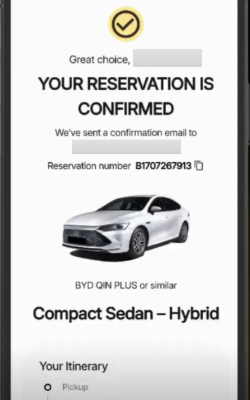
Renting a car in the UAE just became simpler and more seamless. The Hertz Car Rental app puts the rental journey in your pocket, giving you a convenient way to search for a car, choose where and when you need it, complete your reservation, and keep key booking details close at hand.
From daily dashes across Dubai to business bound trips to Abu Dhabi, or longer trips between the Emirates, the Hertz Rent Car app helps you move from planning to pickup with fewer, faster steps.
The Hertz app is a mobile platform built to make UAE car rental more streamlined and stress-free, from your first search to final booking confirmation.
Designed for residents and roaming visitors alike, the app suits anyone who wants the freedom to find and reserve a ride without the wait of a counter or the hassle of phone calls. As a trusted car rental company, Hertz puts everything you need in one simple spot, so sorting your rental takes just a few taps. Choose a flexible car subscription plan, pick your preferred Hertz location, plan your pickup and return dates, browse available vehicles, and book the best fit for your journey, all straight from your smartphone.
It's a practical, people-first solution for anyone who wants the freedom to rent a car wherever their plans take them.
Plans can change quickly, particularly when you are traveling between cities, catching a flight, or fitting transport around a busy working day. The Hertz app keeps the process practical and portable, so your rental details are easy to access while you are on the move.
Ready for your next ride? Simply send your Hertz Corporation ride request through the app, add where and when you want to collect your car, and see what is ready for the road.
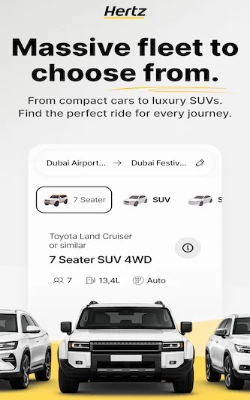
Your plans set the pace, and the right car can make all the difference. From compact cars for quick city commutes to spacious SUVs for family getaways across the UAE, the app brings a world of options to your screen. Browse by category, compare what works for your trip, and save your selection with a service that keeps choosing your car clear and convenient.
Once your booking is sorted, there is no need to dig around for the details. Discover your rental information, browse the latest deals, and double-check the details directly in the app before driving off to your destination, with fewer calls, counter visits, and complications along the way.
From finding your first option to finalizing your booking, the app is built to keep each step clear and connected.
The app brings the booking journey into one place, so you can pick your place, plan your dates, and proceed with your reservation without jumping between platforms.
Download the Hertz app from the App Store or Google Play, create your account, and you are ready to roll. It takes just a few moments to get set up, saving you the hassle of a lengthy start so you can spend fewer hours booking and more time getting on with life.
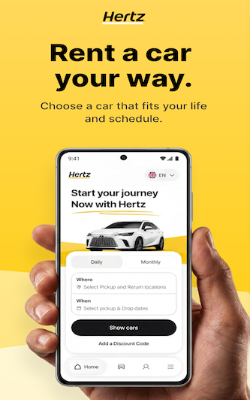
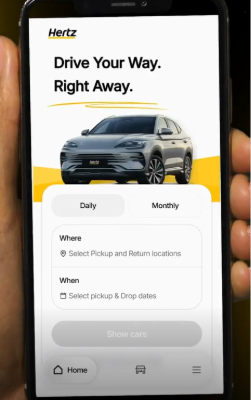
Next, tell the app where and when you need your hire car. Add your pickup and return points under Where, fill in your dates and times under When, then check your data before tapping Show Cars to see what is available.
The app will begin listing cars available for the details you entered. Browse the available categories and compare your choices before selecting a vehicle that fits your plans, from compact cars for city driving to larger options for longer trips.
Before confirming, check the vehicle, dates, locations, cost, payment information, applicable terms, and any additional details connected to the rental.
Once everything matches your plans, proceed with the booking and choose the payment option that works for you. Depending on availability, you can select Pay Now or Pay Later, with Apple Pay also available for added payment flexibility. Then, simply follow the payment steps shown in the app to complete your booking.
After confirmation, you can access the relevant information connected to your reservation through the app. Keeping these details digitally accessible makes it easier to check your plans while preparing for pickup or traveling around the UAE.
The app is built for customers with different driving demands, from a weekend rental to regular work travel.
Visitors can plan their car rental experience before they fly or once they arrive, making UAE travel freer and far easier from Dubai to Abu Dhabi, Sharjah, and beyond. Before you sign up and pay, a helpful habit is to check the criteria and confirm your credentials.
Tourists generally need a passport with a valid UAE entry visa, an eligible home-country driving license and, where required, an International Driving Permit.
Need a car for a few days, a special occasion, or something in between? UAE residents can find, filter, and finalize a rental in the app, fitting it around a busy day rather than building the day around booking.
If you are already a Hertz Middle East customer, keep your member number and must-have documents ready, including the relevant identification and a valid UAE driving license, for a faster, fuss-free rental.
The Hertz fleet is built to cover different drives and different demands, from compact and economy cars to sedans, SUVs, hybrids, and premium models, subject to availability. Compact cars make parking in Dubai and busy city commutes more manageable, while sedans are a practical pick for daily drives. Need more room? SUVs bring space for suitcases and passengers, while premium models have executive travel and special occasions covered.
Availability and prices depend on your dates, destination, rental duration, and vehicle category, so check the app to compare the cars that complement your plans.
Your next UAE drive can begin before you even reach the rental counter. Open the Hertz car rental app to explore available cars, compare your choices, check rewards, relevant insurance details, and discounts, and book straight from your phone. With Apple Pay and the choice to Pay Now or Pay Later, sorting out your rental can fit more easily around your plans.
From a day driving around Dubai to a week on the road or a longer cross-emirate journey, everything comes together in one place. Download the Hertz app, pick your car, plan your route, and put your UAE trip in motion.
Open your confirmed reservation in the Hertz app and check your choices for check-in. If digital check-in is available, simply follow the prompts provided to prepare and progress with your rental. Options may differ depending on your booking and branch.
Tell the app where and when you need your car, then tap Show Cars to see what is available. From there, simply browse, compare, and choose your preferred ride, check the booking details, follow the payment steps, and you are good to go.
Yes. Pick the pickup and return points that work around your plans, with airport and city locations available depending on your journey. It is particularly handy for business trips, helping you plan your points around your schedule rather than the other way around.
Yes. Visiting the UAE? You can use the app to select and sort out your rental before or during your trip. Just make sure you meet the relevant rental and driving requirements, as the documents you need can differ depending on your nationality and license type.
Before you pick up your car, make sure your documents and driving details are ready. UAE residents need valid UAE identification and a driving license, while tourists should bring their passport, valid UAE entry documents, an eligible home-country driving license and, where required, an International Driving Permit. You will also need a credit card in the renter’s name for the security pre-authorization.
Open your reservation to view the options available for that particular booking. Modification and cancellation options may vary based on the reservation, rate, and applicable rental terms. If the change you need is not available in the app, contact Hertz UAE for assistance.